OVERVIEW
Summary
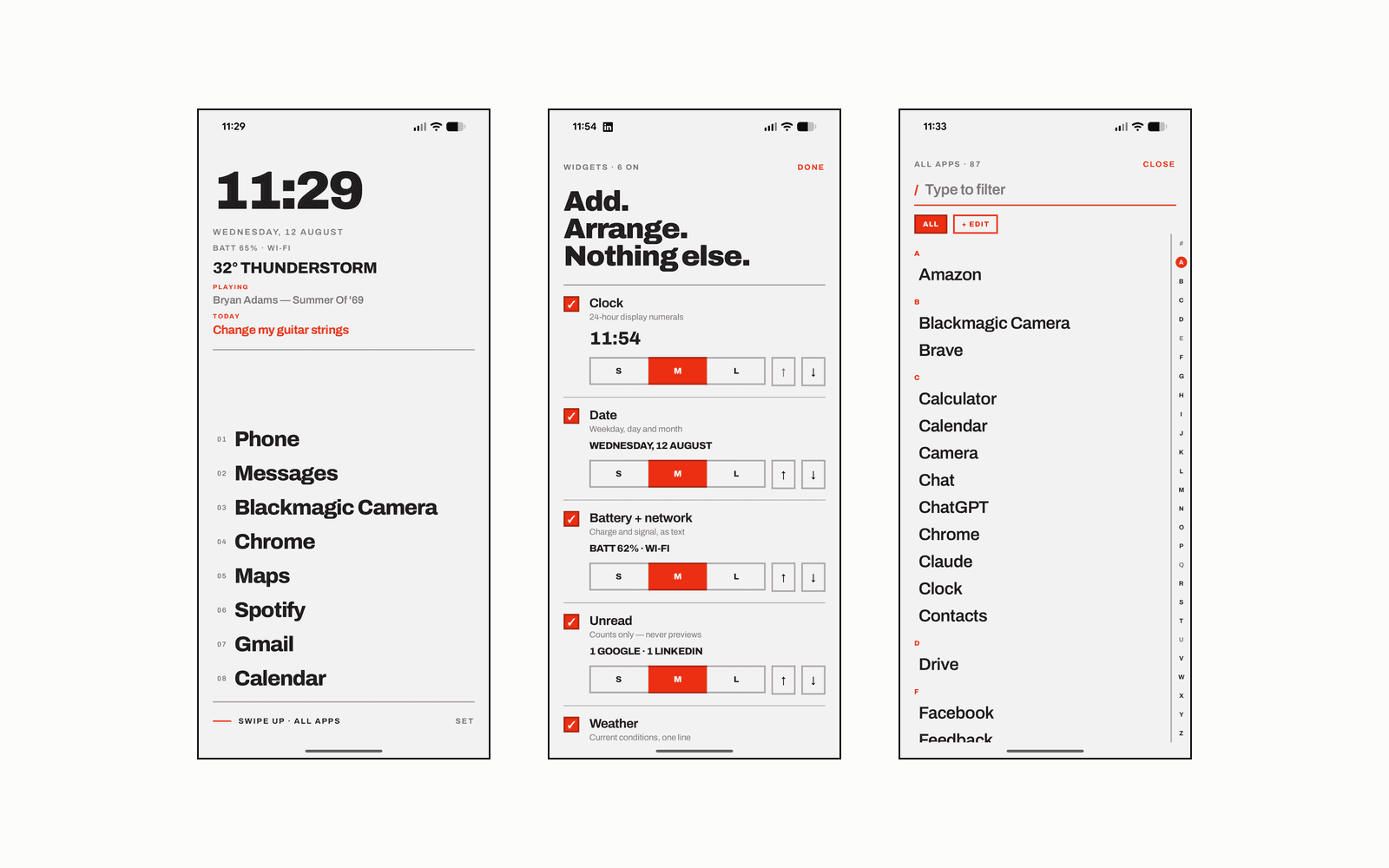
Kolkata — TXT Launcher is an Android home-screen replacement with no icons in it. Every app is its own name set in type, and that typography is the entire interface: flush-left labels, zero corner radius anywhere, 2dp rules, and a single accent.
It is live on Google Play at version 1.8 — built in Jetpack Compose against Android 17, and driven screen by screen across a twelve-device fleet running Android 11 through 17.
01
Why I built it
The home screen is the surface you look at most and think about least, and most launchers are decorated in inverse proportion to how much that decoration earns. An icon grid asks you to recognise a shape; a list of names asks you to read one word.
So: no icons, no grid, no wallpaper to hide behind. Eight app names, a clock, and whatever the widget stack is holding. Everything else is one swipe away.
02
What it does
Home is a list of the apps you pinned — four, six, or eight — under a clock, the date, battery and network, the weather, and whatever is currently playing. A slot can hold a folder rather than an app, opening straight into one category and still counting as one of the eight. The numbers beside the names can go, and so can the bottom bar; with the bar hidden, a long press on empty space opens Settings.
Every swipe and every widget tap is reassignable, to a launcher action or to any installed app. Underneath: an A–Z drawer that opens keyboard-first, categories that group the list from templates, and a hidden-apps list sitting behind the phone's own credential — out of the drawer, out of search, and out of recents.
Typography is the only decoration, so it is the thing you get to change. Three faces ship with it — Archivo, Figtree, and a dot-matrix — or you point it at a .ttf of your own. The clock reads 12-hour, 24-hour, or in words, and follows whatever the phone is set to unless told otherwise.
Grounds are white, dark, a true black that an OLED panel draws by leaving those pixels unlit, one you mix yourself, and an auto that follows the phone. Auto's dark is the dark ground and never the black one — black is a choice someone makes for their own reasons, not one the system's night mode should make on their behalf.
03
Under the hood
Compose throughout, DataStore as the single source of persisted state, and no network traffic at all beyond the one Open-Meteo request the weather widget makes — with the location rounded to about a kilometre, no API key, and no identifier attached. Widget signals are broadcast-driven rather than polled, so an idle home screen costs nothing.
The first frame is the whole problem with a launcher's theme: DataStore is a coroutine away and a frame is not, so anything painting before it loads paints from defaults. The few settings that first frame depends on are mirrored into SharedPreferences and read synchronously in onCreate, then rewritten whenever the real preferences disagree — so a black launcher opens black, from the first pixel.
A colour you mix is walked down in brightness, then in saturation, until text clears 4.5:1 and the accent clears 3:1, keeping its hue. A launcher is the one app you cannot repair from outside: an ink set to the same colour as the ground takes the settings screen that would undo it along with everything else.
Settings export to a file you keep, and three things are deliberately missing from it. The hidden-apps list, because that is the one thing held behind the device credential and writing it into a plaintext file in Downloads would undo that for the sake of convenience. A font you added, which is a file rather than a setting and not the app's to redistribute. And the rating counters, so that restoring settings doesn't restart a schedule you have already lived through. Both screens say so before the action rather than after.
04
The outcome
A home screen that gets out of the way — shipped and maintained on Google Play, verified from Android 11 to 17 — and a demonstration that an interface built entirely from typography gives up none of what an icon grid does.